


Choosing the right web hosting is a crucial first step in launching a website or blog. Your host determines how fast your site loads, how often it stays online, and even how secure your visitors’ data is. In plain terms, web hosting is the service that stores your website’s files on a server and serves them to visitors on demand. A reliable host keeps your site accessible around the clock; a poor one can lead to downtime, slow pages, and frustrated users. In fact, experts note that downtime can hurt your business and SEO, since every moment your site is down means lost sales and trust.
For beginner bloggers, e-commerce owners and content creators, picking the best web host is about balancing cost, performance, and support. A fast, reputable host means your site loads quickly (keeping visitors from hitting the back button) and rarely goes offline (preventing lost traffic). Fast loading pages signal professionalism and trustworthiness, especially for affiliate sites where conversions matter. Similarly, an uptime guarantee of 99.9% or higher is now standard; this means your site is up all but about 45 minutes each month. In this guide, we’ll break down hosting types, key features, a comparison of top providers, and tips to match hosting to your needs: all in beginner-friendly terms, with actionable advice and affiliate insights.
Types of Web Hosting (Which One Fits You?)
Web hosting comes in several flavors. Each type offers different levels of performance, control, and cost. Here are the main ones:
- Shared Hosting: Think “apartment building” for websites. Your site shares a server (its “land”) with hundreds or thousands of others. This keeps costs very low (often just a few dollars per month) and makes it easy for beginners. You get preconfigured servers and support from the host, so you don’t need technical skills. However, because resources (CPU, memory, bandwidth) are shared, performance can suffer if other sites on the server spike in traffic.
Good for: small blogs, personal sites or startups with tight budgets. Many hosts bundle cPanel dashboards and one-click installs on shared plans to make setup easy.
- VPS Hosting (Virtual Private Server): Think “condo.” You still share a physical server, but it’s divided into a few virtual servers, and you get dedicated resources (CPU cores, RAM) that are guaranteed only for you. A layer of virtualization keeps your space separate, so you have more security and stability than with shared hosting. You often get “root access” to configure your environment. This yields faster performance and better handling of traffic spikes, but it costs more (often $20-$100+/month). Some VPS are managed (the host handles updates) or unmanaged (you’re responsible).
Good for: growing websites or small businesses that have outgrown shared plans but aren’t ready for a full dedicated server. A VPS is a good middle ground if you need speed and reliability but still on a budget.
- Dedicated Hosting: Think “owning your house.” You rent an entire physical server for your site alone. You have full control over hardware and software settings. This yields the highest performance, security and customization. However, dedicated servers are expensive (often $100+/month) and require serious technical know-how, or a managed service for that complexity.
Good for: very large businesses, high-traffic e-commerce, or sites with special compliance needs. If your site handles millions of visits or needs specialized server setup, a dedicated server delivers the power, but most beginners won’t need it.
- Cloud Hosting: Think “co-working space.” Your site is hosted on a network (cluster) of virtual servers in the cloud. Resources (CPU, storage, bandwidth) are drawn from this pool, so if one server fails, others fill in. Cloud hosting is extremely reliable and scalable: you can add (or remove) resources on the fly as your traffic grows. You typically pay for what you use. It offers great uptime (since many machines back each other up) and flexibility, but often requires more technical setup.
Good for: any site expecting unpredictable growth or needing high availability. For example, large blogs or online stores that may see traffic spikes benefit from cloud’s elasticity. If budget allows, cloud plans from providers like AWS, Google Cloud, or specialized hosts can deliver top performance.
(Special Mention: Managed WordPress): Some hosts offer WordPress-optimized plans. These are like shared or cloud hosting but come with WP-specific speed tweaks, security, and support. If you run a WordPress blog, managed WP hosting can simplify updates and backups. Examples include Bluehost WP Pro, SiteGround WP, or WP Engine. They often cost more, but include features like automatic plugin updates and WP-centric caching.
Key Hosting Features (What to Look For)
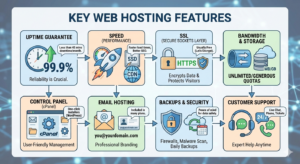
When comparing hosts, certain features stand out for beginners. Here are the essentials, explained simply:
- Uptime Guarantee: This promises how often your site will be online. A 99.9% guarantee means at most ~8-9 hours of downtime per year. Industry standard is 99.9% (so less than ~45 minutes down per month). Always check the Service Level Agreement (SLA): if the host doesn’t meet it, they often give credits or refund. Aim for at least 99.9% (some top hosts even offer 99.99%). The higher the better: even small differences matter (99% vs 99.9% is 7.5 hours vs 45 minutes downtime/month).
- Speed (Performance): Look at server technology. Many hosts now use SSD storage (faster than old HDDs) and built-in caching. Some use LiteSpeed or Nginx servers for extra speed. Also check if the host includes a CDN (Content Delivery Network): this stores copies of your site around the world so pages load fast everywhere. For example, HostAdvice notes fast server response and CDNs are key speed factors. In practice, user reviews about load times and built-in caching (like LiteSpeed cache) are good clues. Remember: faster hosting equals happier visitors and better SEO (Google favors quick-loading sites).
- SSL (Secure Sockets Layer): This is the “lock” icon (HTTPS) on your site. SSL certificates encrypt data between your visitors and your server. This protects customer data and is now expected for any site, especially e-commerce. Luckily, most hosts include a free SSL certificate (from Let’s Encrypt) in their plans. As HostGator explains, an SSL both authenticates the site’s identity and encrypts all information sent through the site. Always ensure your host offers free SSL or easy SSL installation. It also gives a slight SEO boost.
- Bandwidth & Storage: Think of bandwidth as the “data pipe” size and storage as the hard-drive space for your files. Bandwidth is the amount of data your site can transfer to visitors (often measured monthly). Storage (disk space) is how many MB/GB of files (pages, images, videos) you can host. Hosts usually advertise “unlimited bandwidth” or generous quotas. For most blogs and small stores, moderate amounts (like 100GB/month bandwidth, 10-30GB storage) are enough. If you run a media-heavy site, make sure the plan matches your content size. Exceeding limits can incur extra fees or throttling, so pick a plan that comfortably covers your needs with room to grow.
- Control Panel (cPanel): This is your “dashboard” to manage hosting, often cPanel or a custom panel. A good control panel (like cPanel) puts all tools in one place: creating email accounts, installing WordPress, managing backups, etc. cPanel is “a visual dashboard that lets you manage every part of your website and hosting environment, all from one place”. For beginners, cPanel is popular because it’s user-friendly and well-documented. Always check if the host includes an easy panel with one-click installers for apps (WordPress, Joomla, etc.).
- Email Hosting: Many plans include professional email addresses ([email protected]). This is convenient for business branding. It usually ties into the control panel. Even if you don’t need it now, having the option is nice. If unlimited email accounts or large mailbox storage is needed, verify the plan specs (some cheap plans limit the number of free email addresses).
- Backups & Security: Good hosts offer regular backups (daily or weekly) and basic security measures like firewalls and malware scanning. This can save you if something breaks or gets hacked. Check if backups are free or paid. Many hosts also include a Web Application Firewall (WAF) or anti-virus scans. Security can make a huge difference if you run an e-commerce or membership site; it’s worth paying a bit more for.
- Customer Support: 24/7 support is a must for beginners. Look for hosts with multiple support channels (live chat, phone, tickets). 24/7 support with live chat/phone is a key factor in choosing a host. Some top hosts (SiteGround, A2, Hostinger) offer 24/7 chat and phone. Even if you’re a tech-savvy user, it’s reassuring to have expert help available anytime.
By understanding these features, you can better compare hosts. In the next section we’ll see a side-by-side comparison of some top-rated providers (including uptime and other highlights).
Top Web Hosting Providers (Comparison Table)
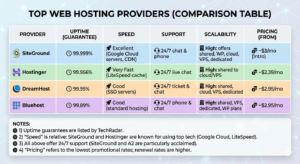
Below is a comparison of several popular hosting providers. We rate them on Reliability (uptime), Speed, Support, Scalability, and Pricing. The uptime values come from TechRadar’s research. “Speed” and other ratings are generalized from each host’s technology and user feedback. Prices are starting plans (often with a multi-year signup).
| Provider | Uptime (Guarantee) | Speed | Support | Scalability | Pricing (from) |
| SiteGround | 99.999% | Excellent (Google Cloud servers, CDN) | 24/7 chat & phone | High: offers shared, WP, cloud, VPS, dedicated | ~$3/mo (Intro) |
| Hostinger | 99.956% | Very Fast (LiteSpeed cache) | 24/7 live chat | High: shared to cloud/VPS | ~$2.39/mo |
| DreamHost | 99.95% | Good (SSD servers) | 24/7 ticket & chat | High: shared, cloud, VPS, dedicated | ~$2.95/mo |
| Bluehost | 99.89% | Good (standard hosting) | 24/7 phone & chat | High: shared, VPS, dedicated, WP plans | ~$2.95/mo |
Notes: 1) Uptime guarantees are listed by TechRadar. 2) “Speed” is relative: SiteGround and Hostinger are known for using top tech (Google Cloud, LiteSpeed). 3) All above offer 24/7 support (SiteGround and A2 are particularly acclaimed). 4) “Pricing” refers to the lowest promotional rates; renewal rates are higher.
This table includes official hosting providers. When you review these on your blog, link to their official sites (e.g. Bluehost, Hostinger, DreamHost, SiteGround). You can earn affiliate commissions for referrals if you use a platform like Cuelinks (see below).
Practical Tips for Choosing Based on Your Needs
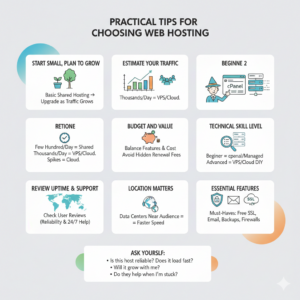
- Start Small, Plan to Grow: If you’re just launching a blog or small site, a basic shared hosting plan is often enough. It’s cost-effective and gets you up and running. You can upgrade later as traffic grows. As WP-Rocket advises, start with “a reputable shared hosting plan” and migrate to VPS or cloud later if needed.
- Estimate Your Traffic: Consider how many visitors you expect. A few hundred daily visitors is fine on shared hosting. For thousands of daily visits or heavy use (e.g. video streaming, large image galleries), consider VPS or cloud hosting. Cloud hosting shines for sites that experience unpredictable spikes, as you can easily add resources.
- Budget and Value: Compare plans by what they include (not just price). A $3/mo plan with limited resources may cost you later in lost visitors. HostAdvice suggests balancing “features and cost”: look for good value, not just cheapest. Make sure the introductory price isn’t hiding much higher renewals. Sometimes paying a bit more for a reliable host (with tools you need) saves time and headaches.
- Technical Skill Level: If you’re not very technical, favor hosts that are beginner-friendly. Managed WordPress or shared hosts with cPanel and one-click setups are easiest. If you’re comfortable with server commands, a VPS or cloud DIY (like DigitalOcean) could be an option, but that’s usually more advanced.
- Review Uptime and Support: Always check reviews for the host’s actual performance and support quality. User reviews on sites like HostAdvice or TrustPilot can flag if a host’s uptime or customer service is unreliable. HostAdvice specifically recommends checking uptime (reliability) and 24/7 support when choosing.
- Location Matters: For faster loading, choose a host with data centers near your main audience. For example, if most visitors are in India, a server in India or nearby yields better response times than one in Europe.
- Essential Features: Ensure the plan includes the basics you need (free SSL, email accounts, daily backups). Don’t be swayed by gimmicks: focus on reliability, speed, support, and security (SSL, backups, firewall).
By aligning these considerations with your site’s size, traffic, and budget, you’ll narrow down the options effectively. Always ask: “Is this host reliable (high uptime)? Does it load fast (good hardware or CDN)? Will it grow with me? Do they help when I’m stuck?” These questions, backed by research and reviews, will guide you to a solid choice.
Hosting and Affiliate Marketing: A Winning Combination

For bloggers and content creators, web hosting isn’t just about your own site: it’s also a popular affiliate niche. Many hosts offer affiliate programs with generous commissions. But to be successful in hosting affiliates, your site itself must be fast and reliable.
Imagine this: you write a review of the “5 Best VPS Hosting Services” and include affiliate links. If your page loads slowly or often goes down, visitors will click away before they even see those links. As Elementor advises, site speed is a “conversion killer”: if your page takes 5 seconds to load, “they are gone”. Likewise, WhiteLabelCoders warns that “slow page speed destroys affiliate revenue” because users abandon sluggish pages. In short, a quality host for your site boosts engagement and SEO, giving your affiliate links more chances to be clicked.
To leverage hosting affiliates:
- Promote Trusted Providers: People feel safer buying hosting from known brands. Bluehost, SiteGround, Hostinger and others have big affiliate programs. Since you’ll be creating content about hosting, link to the official site of each provider. Use your affiliate ID (via a network or directly) so you earn commissions on signups.
- Use Cuelinks for Affiliate Management: Managing multiple affiliate programs can be tricky. Cuelinks is an affiliate aggregator. By signing up, you get one platform to generate affiliate links for many advertisers (including top hosting brands). It can auto-convert normal product links into affiliate ones. This makes monetizing easy and streamlined. For example, you can write a blog post on web hosts, mention Bluehost and Hostinger, and use Cuelinks to insert your affiliate link with just a click.

- Disclose Affiliates: Always include a brief disclosure if you have affiliate links (this builds trust and is often legally required). For example: “This article contains affiliate links. If you click and make a purchase, I may earn a small commission at no extra cost to you.” Keep it concise and transparent.
- Optimize Content: Write helpful, SEO-friendly reviews or how-to guides. Use keywords like “best web hosting provider,” “web hosting for beginners,” etc. Provide value by answering common questions (like this guide does). High-quality content will rank better on Google, attracting free traffic. The combination of organic traffic + affiliate links is the core of affiliate income.
- Encourage Sign-Ups Naturally: Instead of just “Buy Now,” craft a call-to-action like “Check current plans at Bluehost” or “Compare Hostinger plans.” You can do this in sentences: e.g. “For more details or to get started, visit Bluehost’s official website.” Then hyperlink. Because you’ll have affiliate tracking (e.g. via Cuelinks), those clicks earn you commissions if they convert.
By choosing a reliable host for your site, you create a stable platform for your affiliate content. And by promoting great hosts on your site, you tap into a lucrative affiliate market. Many bloggers report that hosting affiliate programs (DreamHost, Bluehost, Hostinger, etc.) pay $50-$100+ per referral, which can quickly add up. As ChemiCloud notes, hosting affiliates often offer “valuable commissions,” making it “a highly effective affiliate marketing system”.
So, in summary: pick a fast, uptime-guaranteed host for your own site, and use that credibility to recommend hosting to others. And consider joining an affiliate network like Cuelinks to make the linking process seamless. By doing this, your hosting content can both help readers choose wisely and generate passive income for you.
Conclusion
Choosing the best web hosting provider means balancing your immediate needs with future growth. For beginners, that usually means starting with a low-cost, user-friendly shared host (most allow upgrades later). Focus on the key factors: high uptime (99.9%+), fast page loads (good server tech and CDN), included SSL, ample bandwidth/storage, and reliable 24/7 support. Use the comparison table above as a starting point for top hosts of 2024.
Remember that your hosting choice can even impact your online income if you do affiliate marketing. A well-performing host helps your content rank and converts visitors into subscribers or customers. And by linking to hosts through a platform like Cuelinks, you can monetize your hosting-related content effortlessly.
In short: research your options, read reviews, and pick a hosting plan that fits your website’s size and goals. A good host is the foundation of your online presence: it keeps your site fast, secure, and always available. With the right hosting choice, your site (and any affiliate efforts tied to it) will have the stable, speedy base it needs to succeed. Good luck, and happy hosting!

Sahil Ajmera is content writer with more than 7 years of work experience in field of Affiliate Marketing, Digital Marketing, etc. He loves saving money on everything. His aim is to get readers exactly what they are looking for and that too without wasting much of their time. Whatever he is writing on, you are sure to find a way to earn & save good!


Comments are closed.