

Most affiliate links send users to homepages, where they drop off before buying. Deep linking fixes this by sending users directly to the exact product or offer, increasing conversions significantly.
Deep linking means using special URLs that take users directly to specific content within an app or website, rather than a generic homepage. For affiliate marketers, deep links simplify the user journey: shoppers land exactly on the product or offer they clicked, boosting engagement and conversions. This is especially powerful in mobile and app-focused campaigns: deep links can detect device type and route users to the right app store and content, accelerating app installs and sales.
We’ll explain deep linking in simple terms, show why it’s a game‑changer for affiliates (user experience, higher conversions, precise tracking, SEO gains), and provide practical examples (social posts, emails, ads, QR codes).
You’ll also see how Cuelinks automates deep linking, comparing manual vs Cuelinks flows, and get a step-by-step demo. By the end, you’ll have a clear plan and call‑to‑action (CTA) prompts to integrate deep linking into your affiliate marketing campaigns.
Table of Contents
What Is Deep Linking?
Deep linking uses special URLs to send users directly to specific content within a site or mobile app. Instead of linking to a homepage, a deep link might point to a product page, category page, or a particular section of an app. For example:
- https://store.com/product/1234?affid=789 might be an affiliate deep link straight to product #1234.
- Mobile app deep links work similarly, e.g. myapp://item?id=1234 opens the product in the app.
The key difference is that a deep link contains both the target content (page or in-app screen) and tracking parameters (affiliate ID, campaign ID, sub-id). This combination directs the user exactly where they need to go and records which affiliate sent them. By reducing steps (users don’t start at a generic page), deep links improve the customer journey and keep affiliates’ tracking intact.
Deep Linking Statistics: Why it Matters for Affiliate Marketing?
Deep linking is vital for affiliates because it dramatically improves user experience and conversions. Some benefits include:
- Higher Conversion Rates: Industry estimates suggest that deep links “increase conversion by reducing navigation steps”. Users land on relevant products or offers immediately, so they are more likely to complete a purchase.
- Deep links improve conversion rates by 20-50%
- Mobile deep linking improves app engagement by 2-3x
- Users are more likely to convert when landing on product pages vs homepage
- Every extra click between user and product reduces conversions.
- Better User Experience: Visitors skip the homepage and get exactly what they clicked. This targeted approach builds trust and engagement.
- Advanced Tracking: Deep links enable SKU-level tracking (adding subid/clickid) so affiliates know which product, campaign or keyword drove each sale. This data helps optimize ads and content.
- App install uplift: In web-to-app flows, deep linking lets you create a unified journey (see next section). For example, a banner can send Android users to Google Play and iOS users to the App Store, each landing on a specific app page or section. This direct path drives more app downloads and usage.
- SEO Benefits: Linking directly to specific content can improve SERP rankings for those pages, as Google sees more relevant links. Thus, deep links “help increase the visibility and ranking” of deep-linked pages.
In short, deep linking makes affiliate campaigns more efficient: higher click-to-conversion rates, better campaign insight, and expanded reach across web and mobile. Affiliates who ignore deep linking leave sales on the table.
Deep Linking Use Cases & Examples
You can implement deep links anywhere you share affiliate content. Here are common use cases with concrete examples:
Social Media Posts/Stories
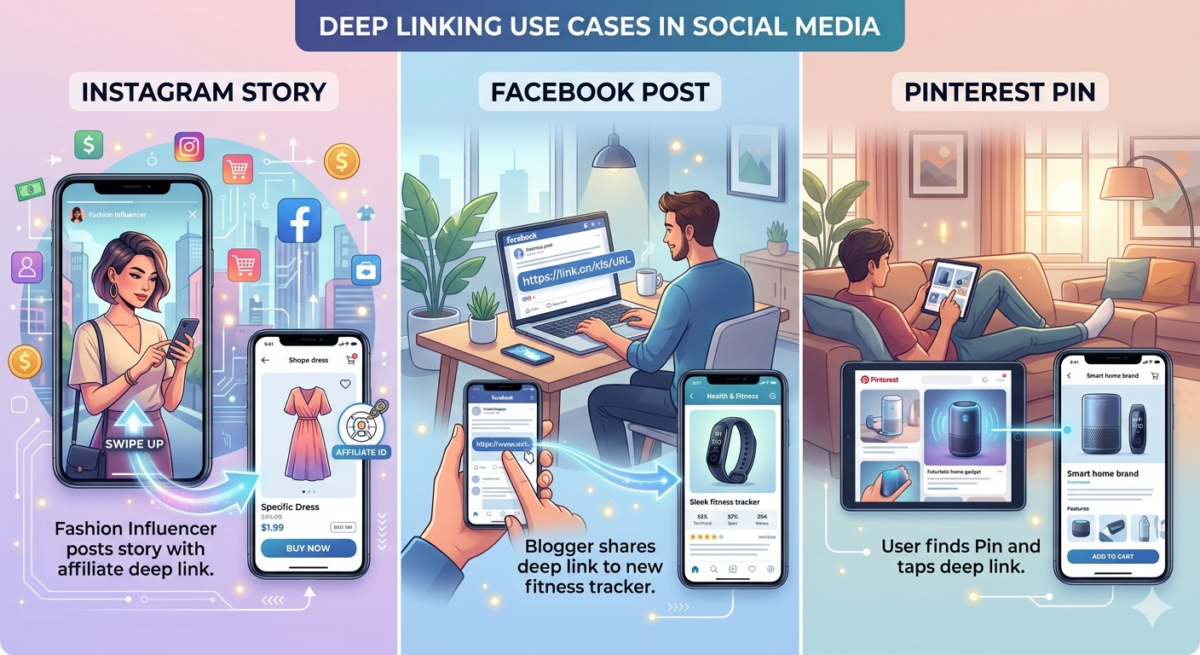
- Instagram Story: A fashion influencer posts a “Swipe up” story link leading directly to a featured dress in the app. The deep link includes the affiliate ID so each sale is tracked.
- Facebook Post: A blogger shares a deep link to a new fitness tracker’s product page. Users click, open it in the app or browser, and see the exact item.
- Pinterest Pin: Pin an image of a gadget with a deep link that opens the product details page.
Email/Newsletters
- Promotional Email: A newsletter features three products; each image links to that product’s app page using a deep link with UTM tags. Readers tap and go straight to the deals.
- Welcome Series: An onboarding email for new subscribers includes a deep link button “Shop Bestsellers” that opens the popular items category in the app.
Text Messages (SMS)
- Sale Alert: Send an SMS blast with a deep link: “50% off jackets! Shop now: [deep link]”. Mobile users click and jump directly to the sale collection.
- Cart Abandonment: An automated SMS with a deep link returns the shopper to their cart inside the app.
Chat/Messaging Inboxes
- WhatsApp Broadcast: Send a deep link in a WhatsApp message for group members to join a limited-time sale page.
- Telegram Channel: Post a deep link in a channel that directs members to an app-only discount, tracking how many conversions came from that link.
Paid Ads (Search/Display)
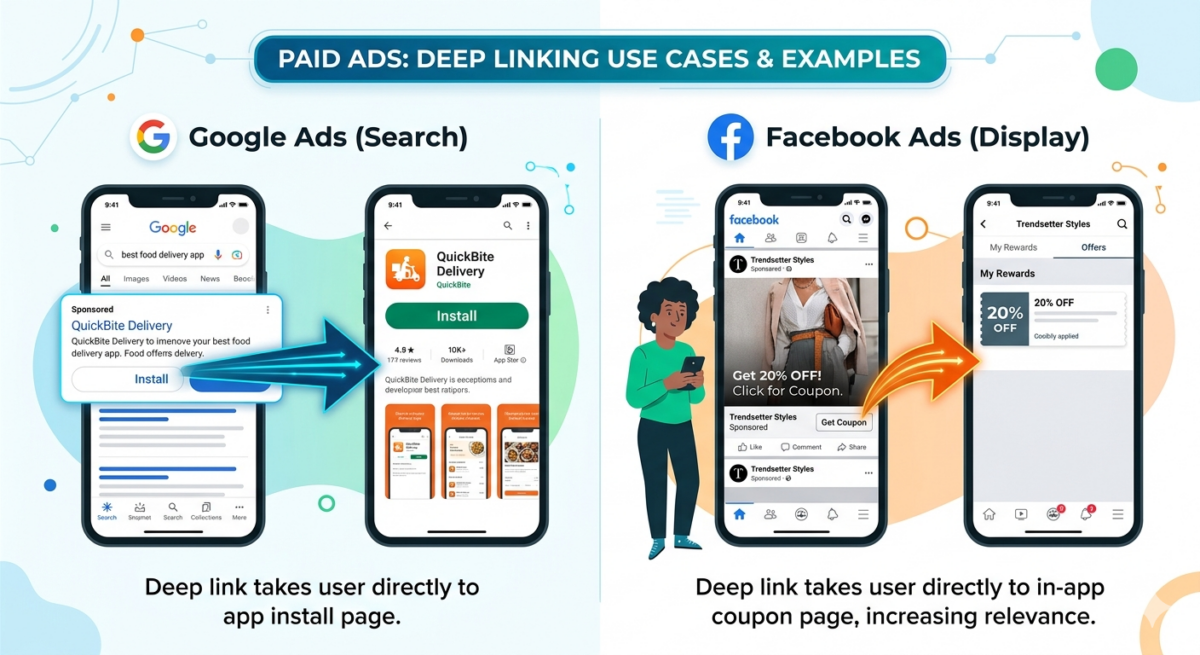
- Google Ads: Use a deep link as the final URL so mobile users go to the app install page for the advertised product.
- Facebook Ads: Create an ad targeting mobile users with a deep link to a coupon page in the app, improving relevance.
QR Codes
- Print Flyer: Generate a QR code that encodes a deep link to an app’s special offers section. Scanning it directly opens the app page.
- Billboard: Place a QR code for a restaurant app’s menu deep link. Passersby scan and see the menu inside the installed app.
Website Banners/Pop-ups
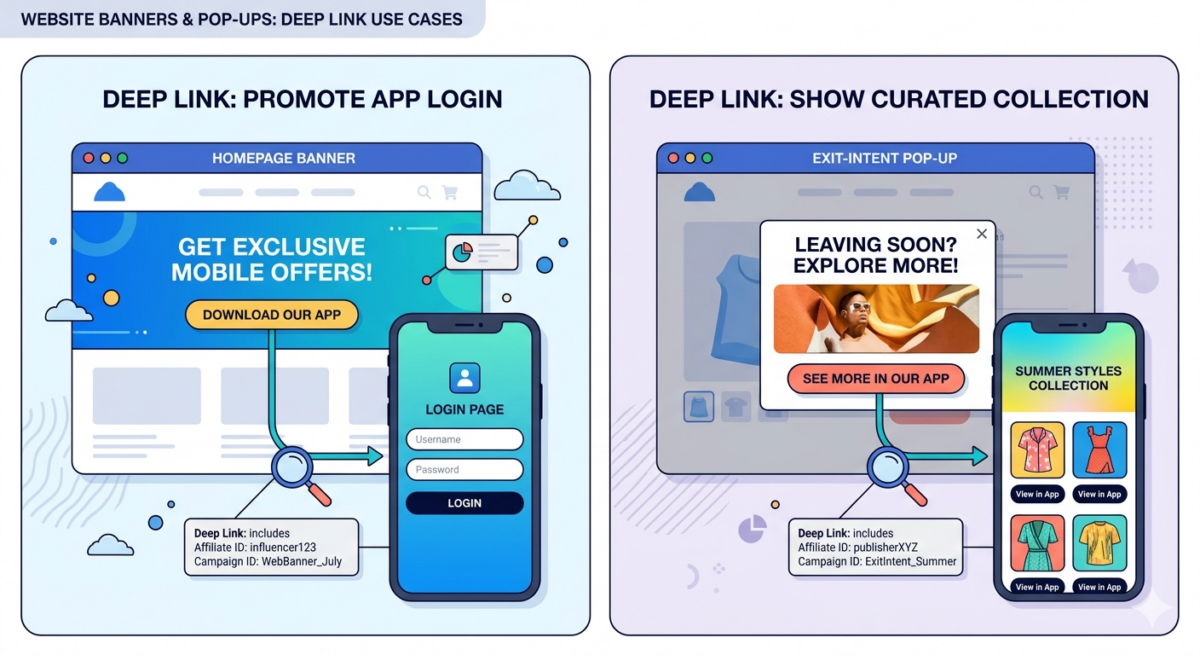
- Homepage Banner: “Download our app” button uses a deep link to open the app’s login page, promoting the app.
- Exit-Intent Pop-up: A pop-up with “See more in our app” leading to a curated collection page inside the app.
In each example, the deep link includes tracking info (affiliate ID, campaign ID) to ensure sales credit and data collection.
Pro Tips
- Always deep link to product, not category
- Test links on iOS + Android
- Use short links for social
Web-to-App Flow (Mobile Deep Linking)
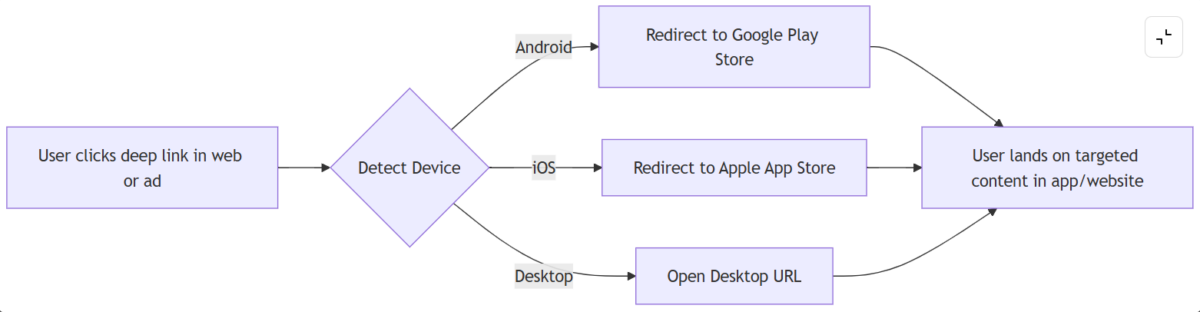
Deep linking shines in web-to-app journeys. The typical flow:
- User Clicks Deep Link: From any platform (web ad, email, social).
- Device Detection: The system checks OS. Android users go to Google Play, iOS to App Store, desktop users to the web URL.
- After Install or Open: Once the app opens, it immediately navigates to the specified in-app page (product, promo, etc.).
- If app installed → open app
- If not → redirect to store → open same product after install
This flow ensures the user’s experience is seamless: they end up exactly where intended, whether on web or in-app.
Mobile vs Desktop impact: Deep linking is especially powerful in India where mobile traffic dominates (60%+), making web-to-app flows critical for conversions.
Affiliate Marketing Statistics
How Cuelinks Automates Deep Linking?
Most affiliates lose conversions due to broken flows, incorrect redirects, or manual link errors. Cuelinks eliminates these issues with automated deep linking. Resulting in Higher conversions, faster campaign execution, and zero technical effort.
- Without Cuelinks, creating deep links requires manual setup, testing across devices, and tracking errors.
- With Cuelinks, you generate a single link that works across the web and app instantly.
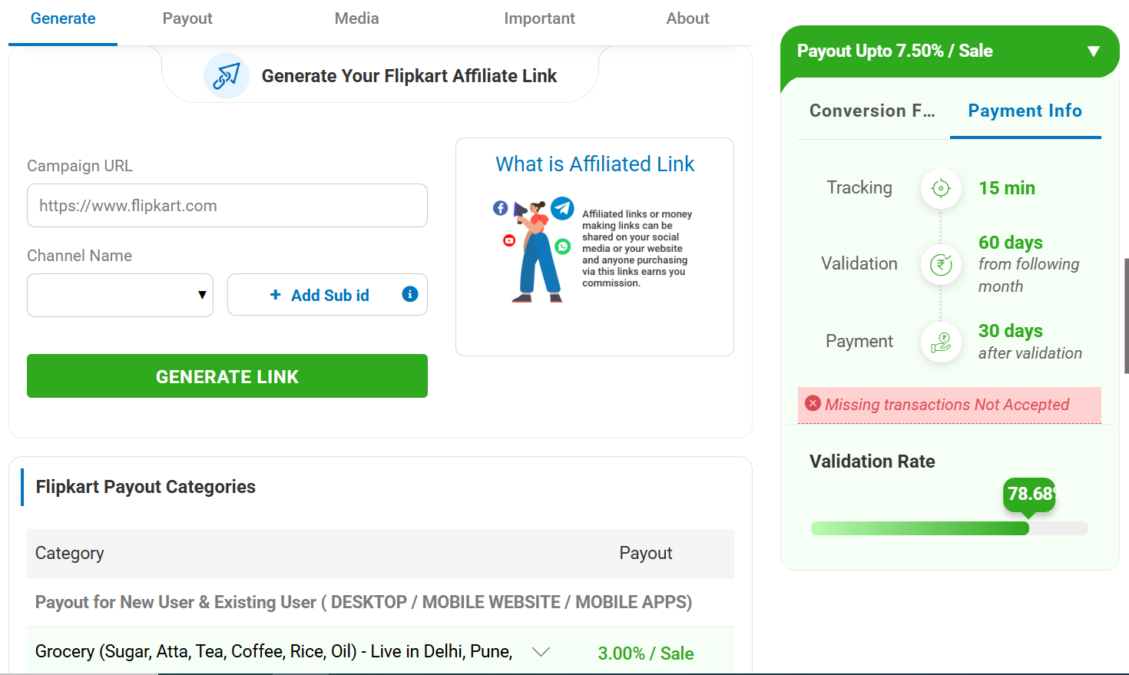
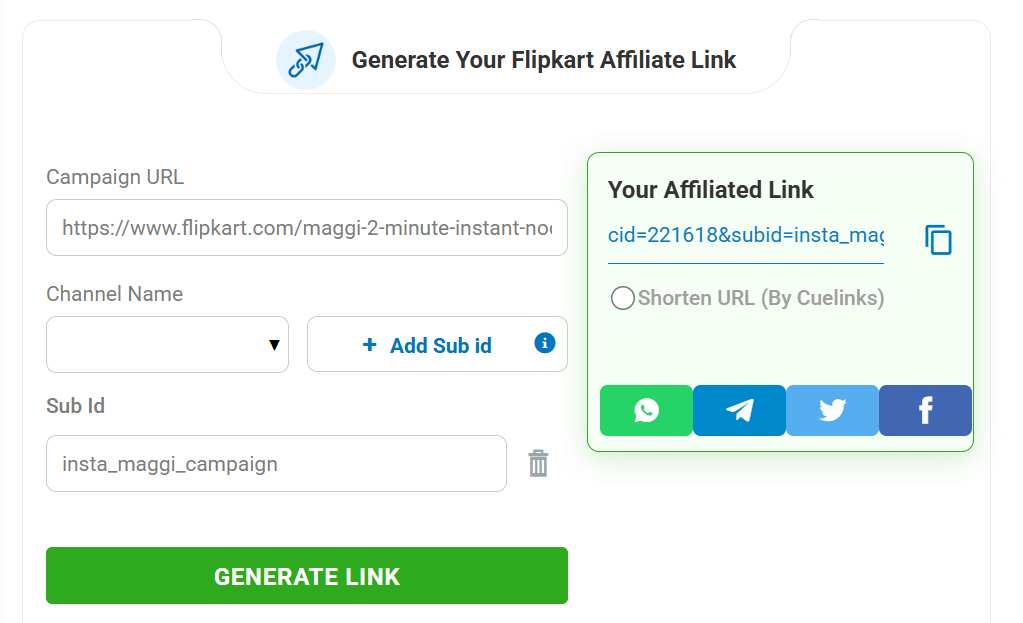
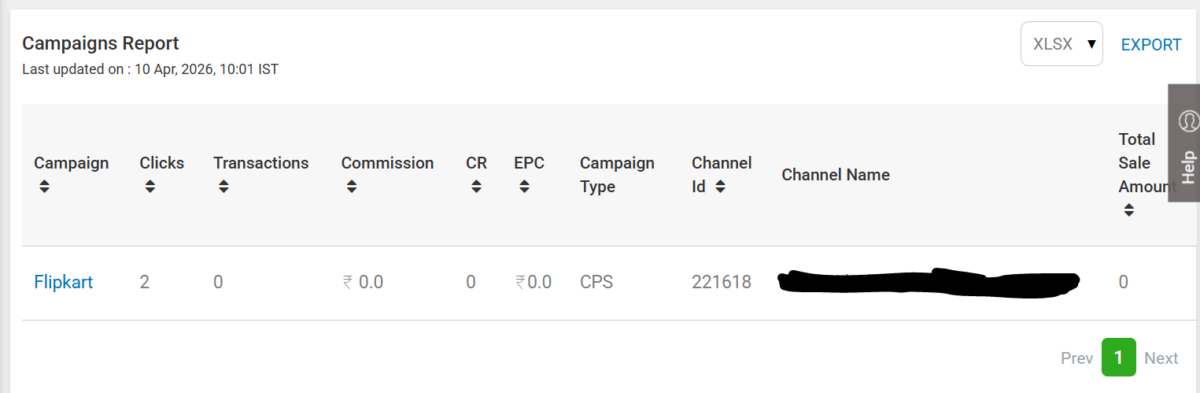
Below is a demo of how it works:
3-Step Deep Link Workflow with Cuelinks:
- Identify the product or merchant page you want to promote.
- Generate an affiliate link through the Cuelinks dashboard.
- Cuelinks automatically ensures the link is a deep link (adding the correct parameters and handling device routing). You get a single URL that works across web and app.
Before vs After: Manual Linking vs Cuelinks
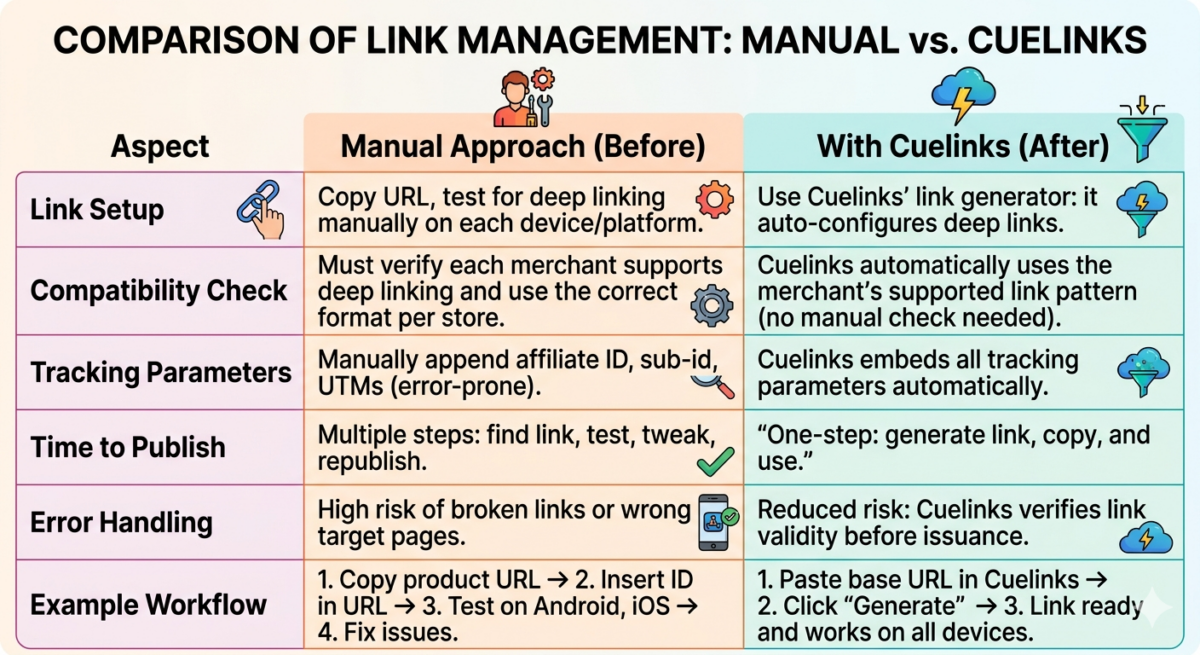
- Without Cuelinks, creating deep links requires manual setup, testing across devices, and tracking errors.
- With Cuelinks, you generate a single link that works across the web and app instantly.
How to Get Started with Deep Linking?
Implementation Checklist
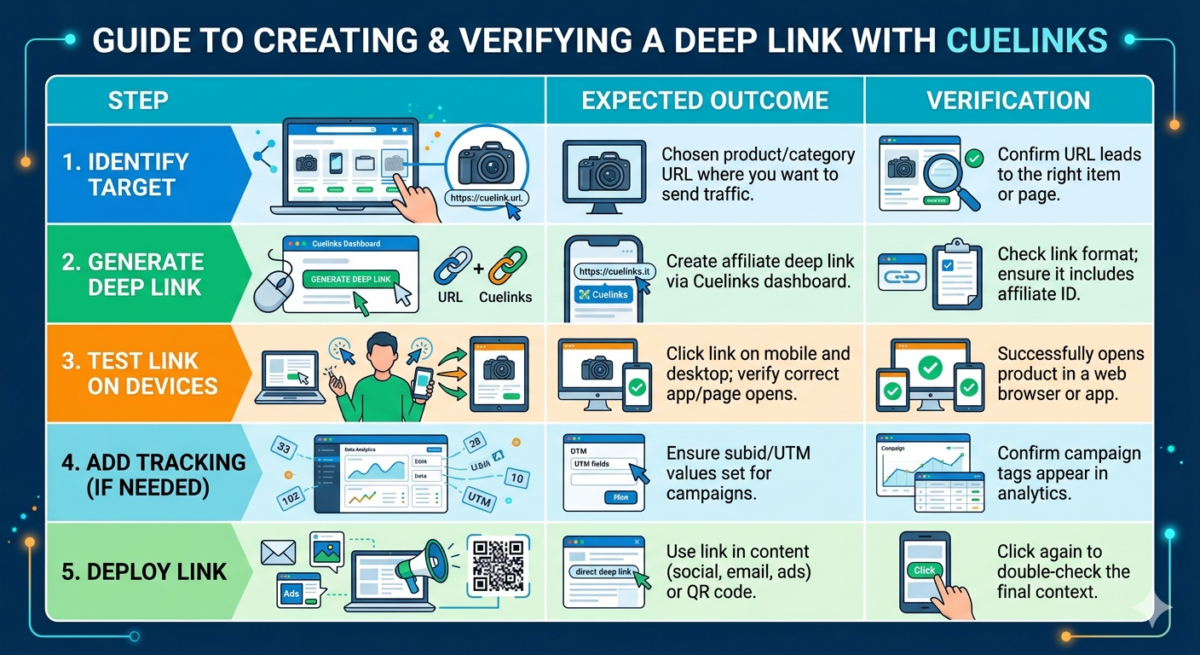
Follow this checklist every time you launch a new deep link campaign to ensure seamless user experience and accurate tracking.
Key Takeaways
- Deep linking sends users directly to product pages
- Improves conversions by 20-50%
- Essential for mobile-first affiliate strategies
- The Cuelinks affiliate marketing platform automates the entire process
Frequently Asked Questions
What is deep linking?
Deep linking means using a link that sends a user directly to specific content (page or app screen), rather than a homepage. It often includes affiliate tracking parameters so the sale is tracked back to you.
How does deep linking improve affiliate conversions?
Because deep links take customers straight to the product or offer they clicked, they reduce clicks and friction. This “direct hit” strategy increases conversions by matching user intent.
Can deep links work on both mobile and web?
Yes: the same deep link can serve all devices. It will open the content in-app if installed, or in a browser if not. This device‑agnostic approach maximizes reach.
How does web-to-app deep linking work?
When a user taps a deep link, Cuelinks detects their platform (Android/iOS/desktop) and directs them appropriately. If not installed, it sends them to the app store (Google Play or App Store); if installed, it opens the app directly to the intended page.
Do I need to get approval for deep links from merchants?
Not manually. Cuelinks handles merchant compatibility behind the scenes. It checks which merchants support deep linking and formats the link for you.

Sahil Ajmera is content writer with more than 7 years of work experience in field of Affiliate Marketing, Digital Marketing, etc. He loves saving money on everything. His aim is to get readers exactly what they are looking for and that too without wasting much of their time. Whatever he is writing on, you are sure to find a way to earn & save good!