

Amazon affiliate via Cuelinks means joining the Amazon Affiliate Program through the Cuelinks network instead of directly at Amazon. Cuelinks is a content monetization platform that gives you access to thousands of affiliate campaigns (Amazon and 1,500+ others) under one roof.
You simply sign up at Cuelinks, activate the Amazon affiliate campaign in your dashboard, and add Cuelinks’ JavaScript snippet to your site. As Cuelinks explains: “sign up for our Amazon Affiliate campaign and install a javascript code on your website that would instantly turn all your normal URLs into an affiliate link”. In practice, this means any Amazon product link on your site will automatically include your affiliate tracking. When a visitor clicks and buys, you earn the Amazon commission on that sale. Cuelinks then aggregates all clicks, conversions and earnings for you, so you manage everything in one place.
Once you join Cuelinks, you access hundreds of merchant programs (including Amazon) from one dashboard. After logging in, you can join “Amazon India” or “Amazon US” campaigns with a click.
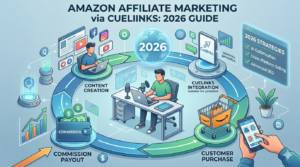
Cuelinks makes the process very easy: no lengthy manual approvals. For example, their Amazon India guide notes that “there are no minimum website traffic or social media followers… we have made it super easy for new beginners to join”. Once approved, you can generate Amazon affiliate links either via Cuelinks’ tools or by letting the installed Cuelinks code do it automatically. This unifies link creation and tracking: you don’t need separate Amazon logins or to manually insert affiliate tags on each link.
In the Cuelinks dashboard you can generate Amazon links instantly. For example, just paste any Amazon product URL into the “Generate Link” tool and click to get a trackable affiliate link.
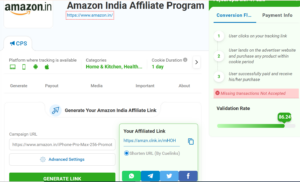
The image above shows Amazon India affiliate link-generation interface.
You can also install the Cuelinks Chrome Extension or WordPress plugin so that as you browse or write content, all Amazon product URLs are auto-converted to your affiliate links. No extra steps are needed: Cuelinks does the heavy lifting (automation😉 “AI ka zamana hai”) of adding your ID to each link.
Advantages of Using Cuelinks
- One-stop dashboard. Cuelinks lets you join Amazon and 1,500+ other affiliate programs (Flipkart, Myntra, Shopify, etc.) from one account. You only signup once, then activate any campaign in your niche. This saves you the hassle of signing up to each affiliate network separately.
- Auto-affiliation tools. After placing the Cuelinks JavaScript on your site (or using their plugins), any Amazon links are auto-affiliated. You can also create links on demand via Cuelinks’ Link Kit (paste a URL for instant tracking link), Chrome extension or WordPress plugin. In short, you don’t have to manually build every link.
- Global coverage. Cuelinks supports Amazon’s affiliate programs in multiple countries. Amazon runs Associates programs in 18 countries (beyond the US), including India, Canada, Japan, France, Brazil, the UK and more. You can activate the Amazon campaigns for India, US, UK, etc. under the same Cuelinks account. This makes it easy to reach international audiences without juggling different affiliate accounts.
- Easy approval. Cuelinks is beginner-friendly: there’s no traffic or follower minimum to join Amazon through Cuelinks. Even new websites and small social pages can get started. Once signed up, you get instant access to the Amazon campaign (and others) without waiting weeks.
- Unified tracking and payouts. All clicks and sales from Amazon (and any other program) are tracked in one dashboard. You see real-time stats (clicks, conversions, EPC, etc.) for each link or campaign, making optimization easier. Cuelinks also handles payment: you reach a relatively low payout threshold (for example, ₹500 in India) and then withdraw to your bank. This means combined commissions (even from multiple programs) count toward the threshold, so you can get paid faster.
- Extra tools & offers. Cuelinks provides additional features like CueWords (auto-linking keywords in your content) and CueWidgets (contextual ad widgets) to increase earnings. It also has an “Offers/Resource” center with active coupons and deals. Promoting these coupons from Cuelinks can boost your conversion rates. According to Cuelinks, it even offers coupons or cashback deals that “can boost conversions” for publishers.
- Revenue share. For India, Cuelinks uses a 75-95/5-25 model: you keep 75-95% (depending on your performance) of the Amazon commission and Cuelinks takes 5-25% (5% for high performing affiliates). This split funds the free tools and support they provide. Earning minimum 75% is still a good deal compared to managing everything yourself.
How to Sign Up and Start Promoting
- Register on Cuelinks: Go to Cuelinks.com and sign up as a publisher (it’s free). In your Cuelinks profile, add your website or channel and fill in payment details (e.g. bank account or PayPal).
- Activate Amazon campaign: After logging in, navigate to Campaigns and search for “Amazon” or select the region (e.g. Amazon India). Click Join Campaign. Cuelinks will guide you to apply. For Amazon India it’s as simple as clicking “sign up for our Amazon Affiliate Campaign”. Once done, Cuelinks will generate a tracking ID for you.
- Install Cuelinks code/plugin: On the Cuelinks dashboard, go to Installation > JavaScript. Copy the provided script and paste it just before the </body> tag on your site. (If you use WordPress, simply install the official Cuelinks plugin and connect your account.) This one-time step ensures all your Amazon links (and other merchants’ links) on your pages are auto-converted into affiliate links.
- Create affiliate links: To promote a specific product, use the Cuelinks Link Kit or Generate Link tool. For example, paste any Amazon product page URL into the Link Kit (or the “Generate Link” box) and click to get a short affiliate link to share. You can also use the Cuelinks Chrome Extension: while browsing Amazon, click the extension button to instantly grab the affiliate link. In all cases, Cuelinks will produce a URL that looks like clnk.in/xyz which redirects to Amazon with your affiliate tag.
- Start sharing links: Place these affiliate links in your content (blog posts, social media, etc.) as you create new posts. If you added the JavaScript, any new Amazon links on your site will be converted automatically, so you can even insert raw Amazon URLs and let Cuelinks handle the rest.
By following these steps, you’ll be earning commissions on Amazon sales without manually editing every link. Cuelinks’ dashboard will then report your clicks, orders, and earnings in one place.
Supported Amazon Programs (Countries)
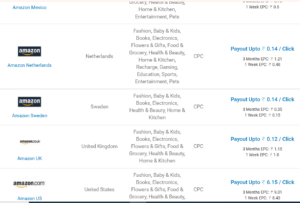
Cuelinks supports Amazon’s affiliate programs in all the major markets. This includes:
- Amazon India (amazon.in): a very popular choice for Indian publishers.
- Amazon USA (amazon.com): covers U.S. shoppers.
- Amazon UK (amazon.co.uk), Amazon Canada (amazon.ca), Amazon Japan (amazon.co.jp), Amazon Germany/France/Italy/Spain (amazon.de/.fr/.it/.es), Amazon Australia (amazon.com.au), etc.
- Amazon also has stores in Brazil, Mexico, Sweden, Poland, Belgium, Netherlands, and other countries as part of the global affiliate program.
In fact, Amazon’s affiliate program is active in 18 countries beyond the US. So if you have an audience in any of these regions, you can use Cuelinks to link to that country’s Amazon store. (For example, a product link can automatically route an Indian visitor to Amazon.in or an American to Amazon.com, depending on the setup.) This global reach is a key advantage: you can monetize international traffic from one Cuelinks account.
Best Ways to Promote Amazon Affiliate Links
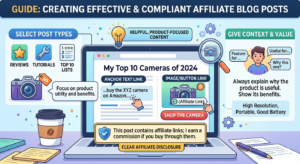
- Blog Posts: Write helpful, product-focused content. For example, create reviews, tutorials or “Top 10” lists of relevant products. Embed affiliate links in the text (e.g. anchor text like “buy the XYZ camera on Amazon”) or on images/buttons. Always give context: explain why the product is useful. In each post, clearly disclose that links are affiliate links (e.g. “This post contains affiliate links; I earn a commission if you buy through them”) to stay transparent.
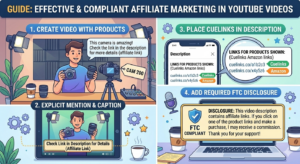
- YouTube Videos: If you make videos, feature products on camera and tell viewers the affiliate links are in the description. For instance, say something like “check the link in the description for more details (affiliate link)”. Then paste your Cuelinks-generated Amazon links in the video’s description. Mention in your video or a caption that the link is an affiliate link and you may earn a commission. This is both required by FTC guidelines and good practice for honesty.
- Social Media: Share your affiliate links on platforms like Instagram, Facebook, Twitter or Pinterest. For Instagram, you might put the link in your bio or use the “swipe up” (Link Sticker) in Stories if available. On Facebook or Twitter, you can post the product image and caption with your affiliate link. Always include a clear call-to-action (like “Shop now” or “Learn more”) and a disclosure such as #ad or #affiliate. For example: “Love this gadget! [link] #ad”. Users expect ads in social, so just being upfront with #affiliate builds trust.

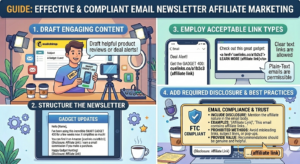
- Email Newsletters: If you have an email list, you can include Amazon affiliate links in your newsletter (plain-text emails are allowed). For example, send product recommendations or deal alerts. Just be sure to mention the affiliate nature in the email. Avoid sending links in ways prohibited by Amazon (see Compliance below).
- Other Channels: You can also promote links in podcast show notes, niche forums (if permitted), Pinterest pins, or any content where your audience looks for product info. The key is always to match links with helpful content and to disclose the affiliate relationship prominently.
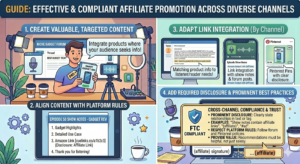
The core principle is to integrate links naturally into valuable content. Instead of spamming links everywhere, focus on content that genuinely solves a problem or answers a question for your audience. According to affiliate marketing best practices, “valuable content attracts clicks more than hard sells.” For example, write an “Ultimate Gift Guide” around holiday season or a thorough product comparison: this gives readers a reason to click and buy.
Boosting Conversions & Using Cuelinks Tools
To maximize your Amazon affiliate earnings via Cuelinks, apply these tips and tools:
- Quality Content & Honesty: As noted, always create content that’s genuinely helpful. Give your honest opinion on products: users trust recommendations from creators. Cuelinks advises that being authentic (promoting things you believe in) builds audience trust. Don’t just post links without context or relevance, as that will hurt credibility.
- Seasonal & Promotional Hooks: Align your links with shopping events. For instance, write special posts for Amazon Prime Day, Black Friday, or festive sales. Shoppers are primed to buy during these events, so a post like “Best Prime Day Deals on Tech Gadgets” can drive higher clicks. Cuelinks highlights that tapping into these seasons can significantly boost affiliate sales.
- Highlight Deals/Coupons: Cuelinks has an Offers section listing current coupons and discounts from merchants. Incorporate these deals into your content (“Use code SAVE20 for 20% off…”) if available. Shoppers love savings, and emphasizing a coupon or discount can improve your conversion rate.
- Use Cuelinks’ Free Tools: Take advantage of Cuelinks’ automation features. The Cuelinks Smart Links (via the installed JS) will automatically convert your content’s valid URLs into affiliate links. Enable CueWords: this tool scans your article for “money keywords” and auto-links them to products. It can instantly insert links for dozens of keywords you might have missed. Consider CueWidgets: it can insert contextual product widgets (like a small ad box with products) into empty spots on your page. These tools work in the background and can increase earnings without extra effort on your part.
- Track and Optimize: Regularly check the Cuelinks analytics. See which Amazon links or pages are performing (clicks, earnings, EPC). Identify your top-converting products and topics, and create more content around them. Likewise, if certain links get clicks but no sales, you might revise how they’re presented. Data-driven tweaks help you improve ROI over time. Cuelinks provides click and conversion reports so you can focus on what works.
- Experiment and Iterate: Try different link placements (early in an article vs. end, in-text vs. buttons), calls-to-action, and content angles. A/B testing is possible: for example, you can create two similar posts with links in different spots and see which converts better. Use Cuelinks’ Sub-ID feature (add custom tags to your links) to test these variations.
- Leverage Bonuses: If Cuelinks is offering a signup bonus (as often promoted on their site), that’s extra earnings when you meet the criteria. Also consider their Referral Program (not covered here) if you can refer fellow publishers. These aren’t required, but they are additional ways to maximize your Cuelinks revenue.
Compliance and Common Mistakes to Avoid
When using Amazon affiliate links (via Cuelinks or otherwise), always follow the rules. Violating them can cancel your commissions. Important guidelines include:
- Disclosure is Mandatory: Always make it clear that a link is an affiliate link. FTC rules require a plain disclosure like “I may earn a small commission if you purchase through these links.” Place this text near your links or at least on the page (and mention on social posts as #ad). Transparency builds trust and is legally required. Never hide the affiliate nature.
- Use Cuelinks’ Link Format: Do not use random URL shorteners (like bit.ly) or cloaking services on Amazon links. Amazon’s policy prohibits obscuring the fact it’s an Amazon URL. Always use the Cuelinks-generated link (which is already shortened via clnk.in). This ensures Amazon sees the proper tracking and your account gets credit.
- Approved Platforms Only: Share affiliate links only on platforms allowed by Amazon. For example, posting links in a closed Facebook group or in certain mobile apps may violate the Associates Operating Agreement. According to Cuelinks, you should “promote campaigns using affiliate links on open groups / open domains only”. In practice, use links on your public website, open social channels, or approved ad campaigns. Also, Amazon forbids using affiliate links in desktop or mobile apps without permission. Stick to websites, blogs, emails (plain text), or social feeds.
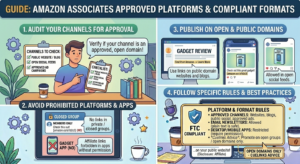
- No Incentives or Spam: Never offer a reward to click your affiliate links (e.g. cash back, points, or bonuses): this is explicitly forbidden. Also avoid cookie-stuffing, brand bidding (buying search ads on “Amazon” keyword), or other black-hat tricks. Amazon and Cuelinks forbid these practices, and doing so can lead to lost commissions or termination.
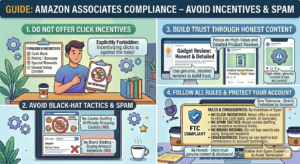
- Follow Amazon’s Rules: Each Amazon affiliate program has its own terms (see Cuelinks’ Important Information section for Amazon). Key points include always including your affiliate tag in the URL (Cuelinks handles this automatically), not implying any endorsement by Amazon, and not using Amazon’s trademarks improperly. For instance, don’t create a website named “amazon-deals.com”: that would violate trademark rules. Read the Associates Agreement if unsure.
- Avoid Common Pitfalls: A typical mistake is spamming lots of links without valuable content. Not only do readers ignore that, but Amazon may penalize sites with little real content. Another mistake is not testing your links: always click your own affiliate link to ensure it routes correctly and the tag is present. If a link is broken or mis-tagged, you’ll miss out on commissions.
By staying compliant, you protect your affiliate earnings. Cuelinks provides guidance on these rules, but as the publisher you’re ultimately responsible for following Amazon’s policies.
Conclusion
Cuelinks streamlines Amazon affiliate marketing for beginners. Instead of juggling multiple Amazon accounts or manually editing links, you get a unified platform with powerful tools. To succeed, focus on creating helpful content and inserting your Cuelinks-generated Amazon links naturally. Use Cuelinks’ features (auto-linking, Link Kit, coupon offers) to work smarter, and always disclose your affiliate relationship. Keep an eye on your stats and refine your approach. With consistent effort and by following the guidelines above, you can turn your blog, social channel or YouTube into a source of steady Amazon commissions through Cuelinks.

Sahil Ajmera is content writer with more than 7 years of work experience in field of Affiliate Marketing, Digital Marketing, etc. He loves saving money on everything. His aim is to get readers exactly what they are looking for and that too without wasting much of their time. Whatever he is writing on, you are sure to find a way to earn & save good!


Comments are closed.