

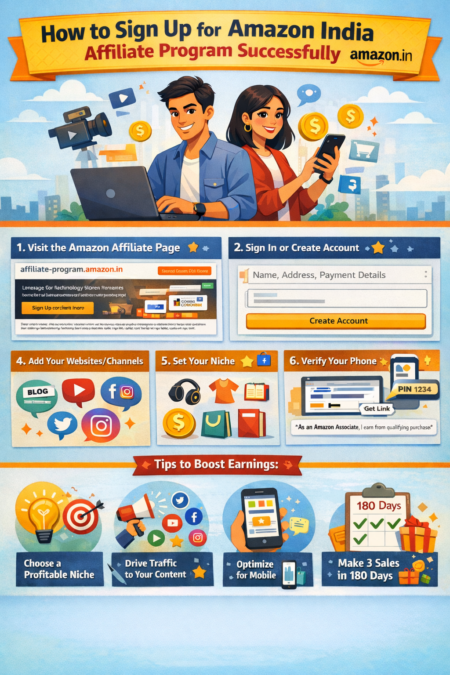
Amazon India’s Affiliate Program lets bloggers, YouTubers, students and other content creators earn money by recommending products on Amazon.in. It is free to join and beginner-friendly: you only need an Amazon account and a platform (like a blog, YouTube channel or social page) to get started.
As an Amazon Affiliate in India, you can share millions of products with your audience using easy link-building tools and earn up to 10% commission on qualifying purchases (CPS (cost per sale) model). This makes it an ideal way for influencers, small business owners, and social media group admins to monetize their traffic with no upfront investment.
If you’re looking for “Amazon India affiliate signup” or “how to become an Amazon Affiliate in India”, this step-by-step guide will walk you through the process.
Step-by-Step Guide to Amazon India Affiliate Sign-Up
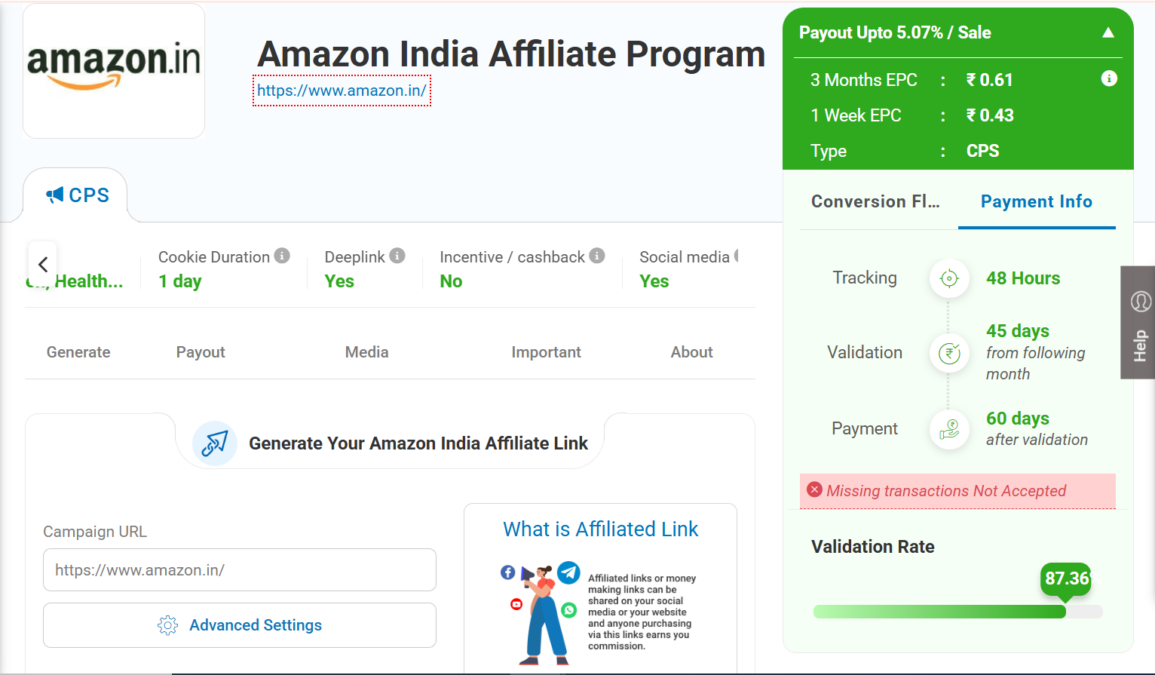
- Visit the Amazon India Affiliate Program page. Click Sign Up (or Join Now) to start the registration. This will bring up the account creation form for the Amazon India Affiliate Program.
- Sign In or Create Your Amazon Account. On the registration page, log in with your existing Amazon.in account. If you don’t have one, create a new Amazon account: it’s free and quick to set up. Use a valid email and mobile number, as Amazon will later verify your identity.
- Enter Your Account Information. Fill in your personal details: name, address, and phone number. Choose your preferred payment method (for India, options include NEFT bank transfer or Amazon gift cards). Make sure to enter the correct bank/IFSC or gift-card details so you can receive commissions smoothly. Also be prepared to submit your PAN/GST information later for tax purposes if needed.
- Add Your Websites or Channels. Amazon will ask where you plan to share affiliate links. List all the websites, blogs, YouTube channels or social media pages (e.g. Facebook groups, Instagram, Twitter) you own. You can add multiple URLs: for example, your blog and YouTube channel. Even if you don’t have a website, you can apply with just a YouTube or Instagram account. This tells Amazon where your affiliate links will appear.
- Set Up Your Profile and Niche. Next, choose the primary category or niche of the products you want to promote (electronics, fashion, books, etc.) and explain how you will drive traffic (SEO, social media, email, etc.). For example, you might select “Gadgets” and say “I will write reviews on my tech blog and share links on Twitter.” Providing clear details helps Amazon understand your content strategy.
- Verify Your Phone Number. Amazon will make an automated call or send an SMS with a PIN code to verify your phone. Enter the PIN on the site to confirm your identity. This step is required to activate your affiliate account.
- Generate Affiliate Links and Disclosure. Once your account is active, log in to your Amazon affiliate dashboard. Use the Cuelinks plugin that appears on Amazon product pages to generate affiliate links. Click on “Get Link” to grab text or banner links for any product. Copy these links into your content (blog posts, YouTube descriptions, social posts, etc.) with a call-to-action like “Check price on Amazon.” Always include an affiliate disclosure on any page with your links (for example: “As an Amazon Associate, I earn from qualifying purchases.”). This builds trust and is required by Amazon.
- Meet the 3-Sale Requirement. After signing up, Amazon will review your application. You must make at least 3 qualifying sales within 180 days of joining. If you fail to do this, the program may close your account (but you can reapply later). Once approved, keep sharing useful content and links: remember, you earn commission on all purchases a buyer makes within 24 hours of clicking your link.
Tips to Increase Approval Chances and Earnings
To boost your approval chances and earnings, follow these tips:
- Follow Amazon’s Policies and Disclose Affiliation: Add a clear disclosure statement (e.g. “As an Amazon Associate, I earn from qualifying purchases.”) on your blog or social posts. Ensure you follow Amazon’s rules (for example, don’t put affiliate links in offline documents or unauthorized ads). Violating guidelines or omitting disclosure can prevent approval.
- Choose a Relevant Niche: Focus on products your audience cares about. Don’t randomly promote unrelated items. For example, if you run a tech blog, review gadgets and electronics. A niche focus builds authority and trust, which leads to higher click-through rates.
- Drive Consistent Traffic: Create high-quality, SEO-friendly content (blog posts, reviews, “best-of” lists) and share it on social media and YouTube. Work on keywords (e.g. “best headphones under ₹2000”) to bring ready-to-buy visitors. The more visitors you attract through SEO and promotion, the more potential buyers you’ll get.
- Optimize for Mobile: Ensure your website and content load well on mobile devices, as many Amazon shoppers browse on phones. A mobile-friendly design makes it easier for users to click your links and purchase.
- Leverage Seasonal Campaigns: Publish timely content around shopping events (Diwali, Prime Day, Great Indian Festival, Black Friday, etc.). For example, create posts like “Top Diwali Gift Ideas from Amazon.” Shoppers are in buying mode during sales, so conversion rates are higher.
- Update and Refresh Content: Periodically revisit old posts to update links and information. Replace outdated products with new releases and fix broken links. Fresh content ranks better in search and keeps your recommendations relevant.
- Analyze and Optimize: Use your Associates dashboard and analytics to see what links are getting clicks. Experiment with different calls-to-action or link placements. For instance, test buttons like “Buy Now” vs “Check Price.” Small tweaks can improve click-throughs and sales.
- Be Patient and Consistent: Affiliate marketing takes time. Many beginners quit too early. Keep publishing valuable content regularly and steadily promote your links. Over time, as traffic grows, your earnings will increase.
Note: The Amazon Affiliate Program in the Cuelinks Affiliate Network requires only name, mobile number, email, company name, and websites or social media urls. After approval, simply share your content pages where you wish to promote Amazon affiliate links to get access from the Cuelinks team, along with dedicated support to run and scale-up your campaigns.
By following these steps and tips, you can successfully sign up for the Amazon India Affiliate Program and start turning your content into income. Remember, the key is to add value to your audience and naturally integrate Amazon product recommendations into your content.
Other Country Amazon Affiliate Programs you can Signup for:
| Affiliate Program | Commission Rate (Dynamic-CPC (cost per click) model) |
| Amazon France | ₹0.14 |
| Amazon Mexico | ₹0.12 |
| Amazon Singapore | ₹0.14 |
| Amazon Canada | ₹0.12 |
| Amazon Sweden | ₹0.14 |
| Amazon Spain | ₹0.14 |
| Amazon Germany | ₹0.12 |
| Amazon Italy | ₹0.12 |
| Amazon Poland | ₹0.14 |
| Amazon UK | ₹0.14 |
| Amazon US | ₹6.08 |
| Amazon Japan | ₹0.14 |
| Amazon Belgium | ₹0.14 |
| Amazon Brazil | ₹0.14 |
| Amazon Netherlands | ₹0.14 |

Sahil Ajmera is content writer with more than 7 years of work experience in field of Affiliate Marketing, Digital Marketing, etc. He loves saving money on everything. His aim is to get readers exactly what they are looking for and that too without wasting much of their time. Whatever he is writing on, you are sure to find a way to earn & save good!