

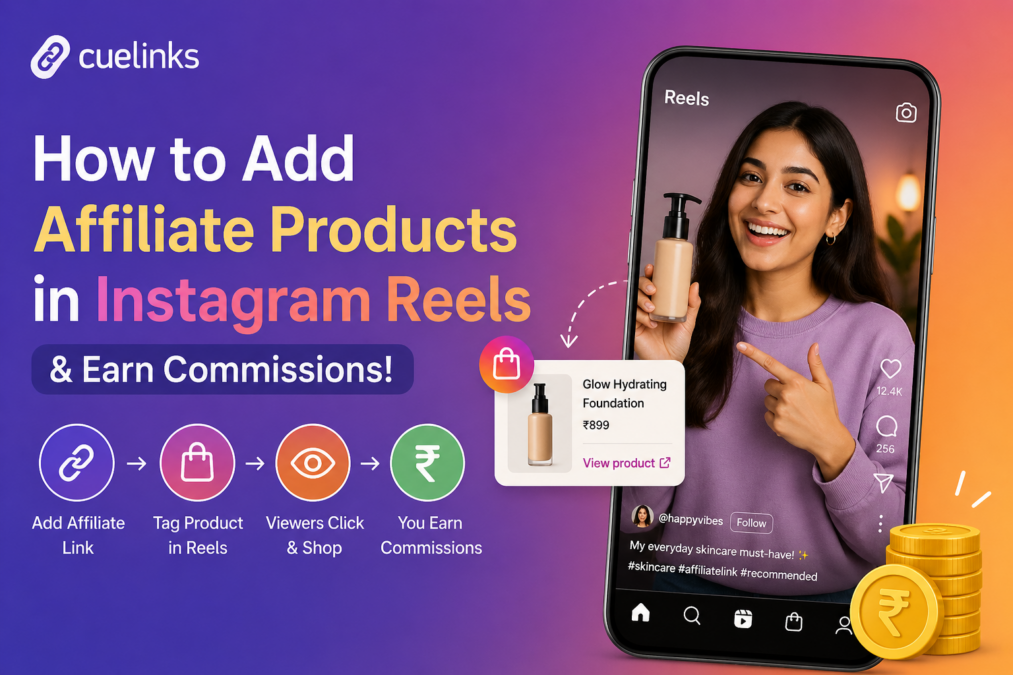
To tag products in Instagram Reels and earn affiliate commissions, creators need access to Instagram Shopping or affiliate-enabled product tagging. First, join affiliate programs (such as Amazon Associates, brand affiliate programs, or affiliate marketing platforms like Cuelinks) and ensure your Instagram account is set up as a professional (Creator or Business) account with shopping features enabled.
When creating a Reel, tap “Add Products” before publishing and select the product from your connected catalog or affiliate marketplace. You can also copy-paste the product’s link directly. Once tagged, viewers can tap the product directly within the Reel to view details and make a purchase.
To increase conversions, create short, engaging Reels that clearly demonstrate the product’s value: such as quick reviews, tutorials, or before-and-after use cases. Use a strong call-to-action (CTA) in your caption (e.g., “Tap the product tag to shop”) and include affiliate disclosures like #ad or #affiliate.
Key tips to maximize earnings:-
- Focus on niche-relevant products your audience trusts
- Hook viewers in the first 3 seconds
- Use trending audio and formats
- Post consistently and analyze performance insights
- Combine product tagging with “link in bio” for added traffic
Affiliate commissions are earned when users purchase through your tagged products or associated affiliate links. Consistent content, audience trust, and product relevance are essential to scaling income through Instagram Reels affiliate marketing.
Table of Contents
Instagram’s New Affiliate Features (Reels Shopping)
Instagram has officially enabled native affiliate tagging in Reels. Now, eligible creators can tag products in Reels using affiliate links and earn commissions when viewers make purchases. As announced by Meta’s Adam Mosseri, “You can now use affiliate links to tag products in your Reels and earn a commission when people shop your content”.
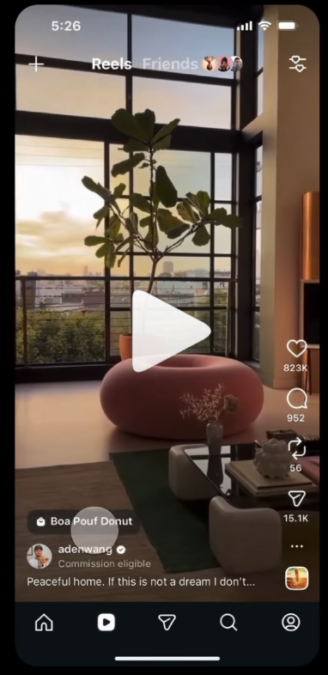
This feature is rolling out globally (first in markets like US, India, Brazil, etc.), and unlike TikTok Shop, Instagram takes no cut: 100% of the brand-set commission goes to the creator.
Reels with affiliate tags automatically enter Instagram’s Partnership Ads hub, meaning brands can easily boost them as ads with the creator’s handle: amplifying reach without extra work.
Eligibility & Technical Requirements
To use affiliate tags in Reels, you need a Creator or Business account (free to upgrade) in an eligible region, and compliance with Instagram’s monetization policies. Creators must be at least 18 years old and typically have 1,000+ followers.
You’ll also need to join one or more affiliate programs. For example, Cuelinks lets you quickly access 1,000+ merchant programs (Amazon, Flipkart, etc.) and generate affiliate links even without a website.
Unlike feed posts, Reels can now include up to 30 product tags per video. Each tagged product must be a single item listed in a verified Meta commerce catalog with an active price. If the brand isn’t on Instagram or lacks a catalog, you can still paste any affiliate URL via Cuelinks into the Add Products field and select the product manually.
In summary:
- Account: Creator/business, 18+, 1,000+ followers (region-specific).
- Commerce Catalog: Brand must have a product catalog on Instagram (searchable by handle).
- Affiliate Link: Use a valid affiliate product URL (from Cuelinks or other network) or paste any product link in the “Add Products” tab.
- Affiliate Program: Sign up for Cuelinks (or other networks) to get tracking links. Cuelinks auto-converts pasted URLs to affiliate links.
Step-by-Step Tutorial: Tagging Affiliate Products in Reels
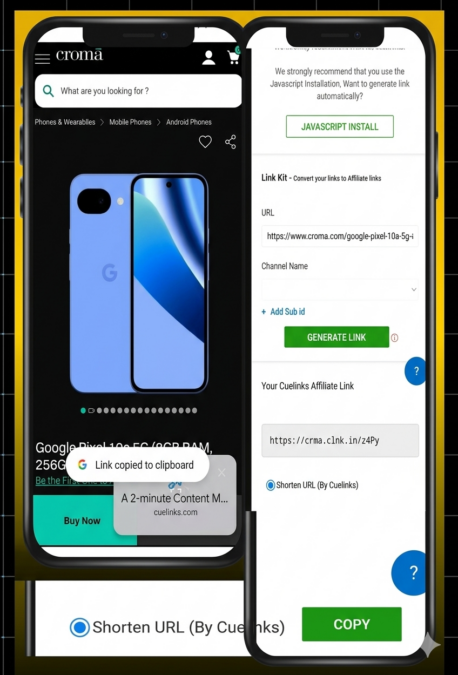
- Generate Your Affiliate Link: Use Cuelinks to get the affiliate link for your product. In the Cuelinks dashboard or browser extension, paste the product’s landing page URL and copy the short affiliate link (clnk.in…). Alternatively, if using the Cuelinks script/plugin on your own blog, any product link on that page auto-converts for you.
- Create or Edit Your Reel: Record or import the video in Instagram as usual. Add your content (review, demo, unboxing, etc.).

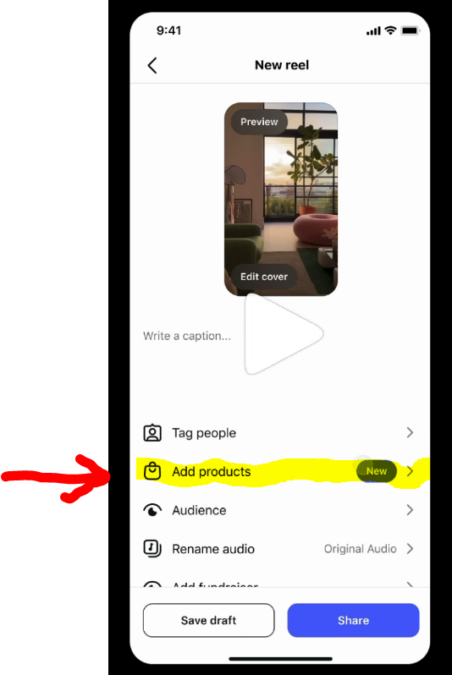
- Add Products: At the final share screen (where you write captions), tap “Add Products” below the caption box. If you don’t see this button, your account may not yet have the feature (rare case).
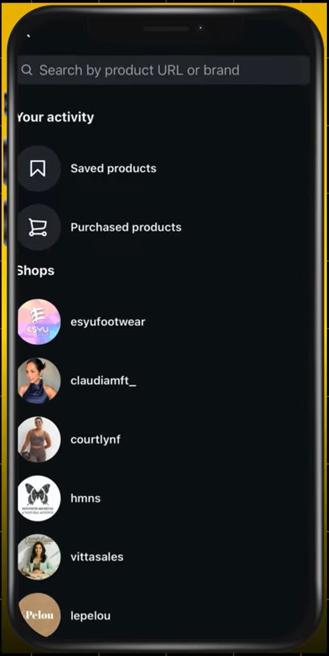
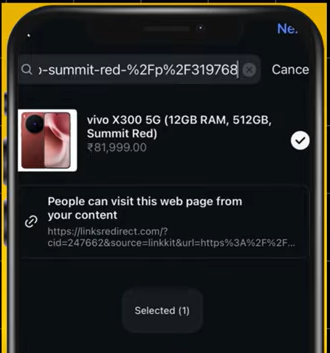
- Link Your Product: Choose how to add your product tag. You can either paste the Cuelinks affiliate URL directly, or tap “Search brand” and enter the brand’s Instagram handle to pull up its catalog. If the product is in the catalog, select it; otherwise paste the URL and select the matching item.
- Select Product & Apply Tag: When you find the product, tap to tag it. Instagram will place a movable label over your video (you can reposition it).
- Add More Products (Optional): Repeat to tag up to 30 products. Each tag will appear as a separate tappable label on the finished Reel.
- Write Caption & CTA: In the caption, include a clear call-to-action (e.g. “Tap the tag above to get!”) and affiliate disclosure (e.g. #ad or “affiliate link”).
- Publish: Share your Reel. Viewers will see the product tags; tapping one takes them to the product page on the merchant’s site or app. If they buy or click (CPC campaigns), the affiliate network tracks the sale and credits your commission.
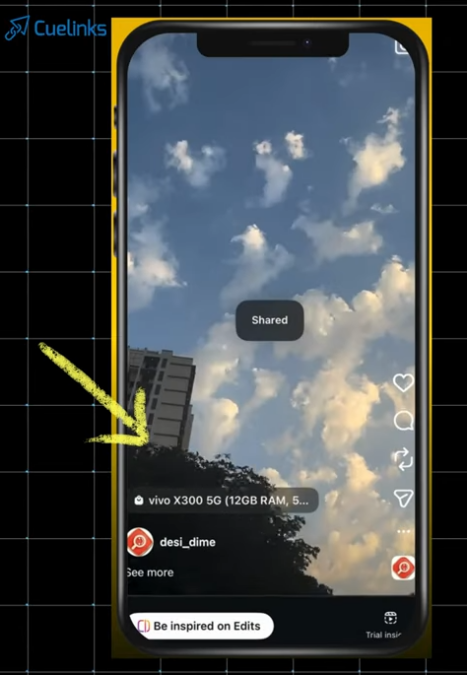
By following these steps, your Reels become directly shoppable. For example, if you showcase a gadget, tap Add Products and paste its affiliate link. After tagging, the Reel will display the product name with a shopping bag icon. Anyone can tap it to visit the product page (as shown below). Don’t forget to disclose clearly that you earn a commission and use an enticing thumbnail or opening shot to grab viewers’ attention.
How to Add Affiliate Links in Instagram Reels 2026? | Earn from Product Reels Without Link in Bio [Video]
Alternative Affiliate Link Methods (Stories & Bio)
Not all creators have access to native product tags yet, so use these fallbacks:
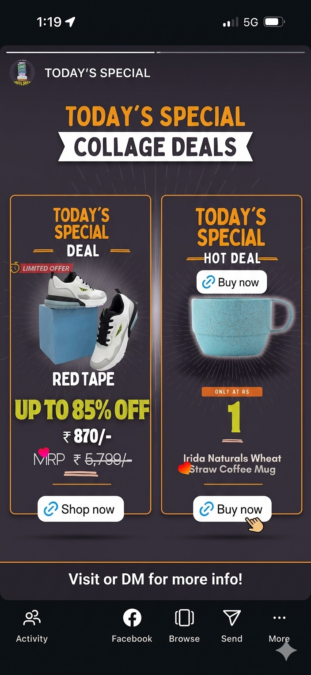
- Stories Link Sticker: Every account can add a link sticker in Stories (no 10k-follower requirement). Create a Story about the product, tap the sticker icon, and add your Cuelinks URL. Customize the sticker text (e.g. “Shop Now”) and include a text overlay CTA (“Swipe up!”). Save the Story to Highlights for longer visibility.
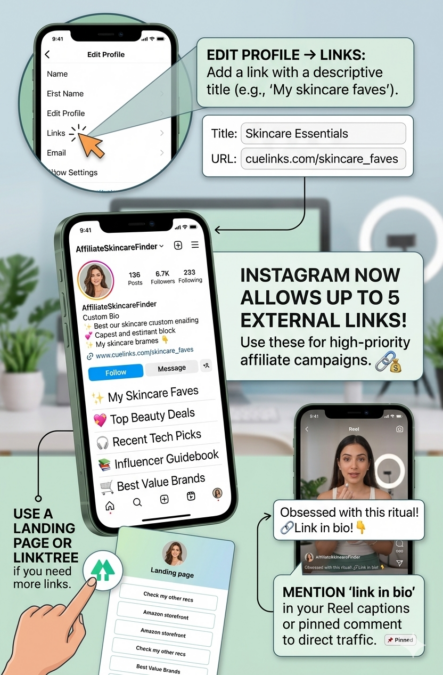
- Bio Link(s): Instagram now allows up to 5 external links in your profile bio. Use this for high-priority affiliate campaigns. Edit profile → Links, and add a link with a descriptive title. For example, title it “My skincare faves” rather than a raw URL. Mention “link in bio” in your Reel captions or the Reel’s pinned comment to direct traffic. Use a landing page or Linktree if you need more links.
These methods can supplement Reels. For instance, create a Reel highlighting a fashion item and say “Check my bio link to shop!” in the caption. For best results, rotate your top bio link to match current content.
Creative Best Practices: Captions, CTAs, Thumbnails, Disclosures
- Captions & CTAs: Engage viewers with a compelling hook. Use action verbs (e.g. “Shop this look,” “Grab yours now”). Examples: “✨ Loving these sneakers? Tap the tag or link in bio to shop: I earn a small commission at no extra cost! 🙏 #ad”. Always state the benefit or exclusivity (“limited edition,” “sale alert”).
- Disclosures: Transparency is required. Always include clear disclosures like “#ad”, “affiliate link”, or “I earn commission” near the beginning of captions or as on-screen text. The FTC mandates this clarity: “if there’s any material connection… disclose it in plain, unavoidable language… placed right where the endorsement or link appears”. For Reels, overlay text like “Ads” or “I earn a commission” for several seconds at the start of the video.
- Thumbnails/Covers: Choose a vibrant, high-resolution cover image (the frame or custom image) that clearly shows the product or your face with the product. This increases click-through in the Reels grid.
- Video Hooks & Timestamps: Grab attention in the first 2-3 seconds (e.g. action shot, question, or close-up of product). If your Reel mentions multiple products or has sections, consider adding subtle on-screen text or timestamps (e.g. “02:10: Product Name”) in the caption for clarity, though Instagram doesn’t support clickable timestamps the way YouTube does. The idea is to guide the viewer.
- Hashtags & Tags: Use a mix of niche and broad hashtags (e.g. #fashionaffiliate, #makeupreview). Tag the brand’s Instagram account in the caption if it’s an official partnership (even if it’s an affiliate, it builds goodwill).
Monetization & Tracking Mechanics
- Commissions: Each brand/affiliate program sets its own commission rate. On Indian e-commerce, rates often range 3-15%. For instance, Cuelinks notes that “followers click and buy, you earn a percentage (often 5-15%).” Be sure your affiliate ID is embedded in each link; Cuelinks auto-inserts this for you.
- Cookies: The cookie duration varies by merchant (typically 24 hours to 30 days). For example, the Amazon India Affiliate Program cookies last 24h (extended if purchase added to cart), Flipkart Affiliate Program’s cookies last 30 mins, etc. Use URL parameters or Google Analytics UTM tags if you want extra tracking.
- Payouts: Affiliate networks (including Cuelinks) pay commissions after the sale is confirmed and any return/cancellation period passes. Cuelinks pays weekly on a net-60 basis and offers a very low minimum threshold: just ₹500 (about $6). No fees or platform cut are taken beyond this; Meta does not deduct anything from your affiliate earnings. Payment methods include bank transfer (NEFT/RTGS) in India or PayPal for international accounts.
- Tracking: When a viewer taps your affiliate tag on Instagram, they’re redirected through an affiliate tracking link. The affiliate network (e.g. Cuelinks via its own system) logs the click and ultimately the sale. When a viewer taps a tagged product, the affiliate tracking link follows them through to the brand’s checkout. When the purchase is confirmed, the commission gets attributed to the creator and paid out through the platform the brand uses. In practice, brands plug their existing affiliate programs into Instagram’s system, so creators use the same links they would elsewhere.
Instagram Policies & Affiliate Compliance
- Terms & Guidelines: Instagram’s policies allow affiliate links, but you must follow its Branded Content rules and general commerce policies. If a brand is paying you (sponsorship), you must use the “Paid partnership” tag. For affiliate links (no upfront payment), this tag isn’t mandatory, but FTC regulations still apply. Treat affiliates as you would sponsorships: disclose clearly.
- FTC Disclosure: The FTC requires that any material connection be disclosed “in plain, unavoidable language, placed right where the endorsement or link appears”. On Instagram, that means using “#ad,” “#affiliate,” or overlay text like “I earn commission from links” early and prominently in each Reel. Avoid burying disclosures in tiny text or hashtags.
- Shopping Policies: If using Instagram Shopping/Commerce Manager (for your own products), follow those setup rules. For affiliate tagging, ensure the product’s source (catalog) complies with Instagram’s commerce standards. Do not tag any prohibited items or engage in spammy link use. Instagram may disable affiliate features for accounts violating policies (e.g. posting false or misleading links).
- Recent Updates: Notably, Instagram has pivoted toward creator-led affiliate commerce. Older shopping features (like the Shop tab or Checkout) have been sunsetted. Today, the focus is on tools like Reels product tags and link stickers, which are explicitly designed for creator use. Always check Instagram’s official resources for the latest shopping and monetization policy updates.
Comparing Affiliate Product Link Methods in Reels
| Method | How It Works | Pros | Cons | SEO / Monetization Impact |
| Native Reels Product Tags (Affiliate Tags) | Use “Add Products” in the Reel share screen to tag items. Viewers tap the floating label to open the product page. | • Directly clickable in video (high conversion)• Up to 30 products per Reel• Appears in Partnership Ads Hub • No extra steps for user | • Requires brand’s commerce catalog or pasting URL • No visible text link (SEO can’t crawl tags) • Currently limited rollout to qualifying accounts | • Maximizes impulse buys (seamless funnel) • No anchor text for search engines (not crawlable) |
| Link Sticker (Story) | Add a story with a link sticker to the affiliate URL, and mention it in your Reel (“check my story for link”). | • Available to all users• High conversion in stories• Interactive (swipe/up tap) sticker format | • Expires after 24h (unless saved as highlight) • Requires users to watch your Story • Only 1 link per sticker | • Good click-through for engaged audience• Story content not indexed by search engines |
| Link in Bio | Use Instagram’s multi-link feature (or a Linktree) in profile. In the Reel caption/teaser say “link in bio” or “visit my profile”. | • Works for any account (even new users) • Can host multiple links via a landing page • Always visible on profile | • Adds at least one extra tap for user • Many users ignore “link in bio” • Limited text to specify link content | • Drives site traffic (can help SEO indirectly) • Link placement far from content (less immediate) |
| Cuelinks Short Links | Use Cuelinks’ generated short links (clnk.in) anywhere: e.g. caption, comments, or story. These redirect to affiliate products. | • Short, mobile-friendly URL • Tracks clicks via Cuelinks platform• Use in comments (with a CTA like “DM me for link”) or bio | • Not natively clickable in Reel captions • Must be manually typed by user if not link sticker (e.g. in Instagram Guides or comments) | • Versatile use across platforms • If posted on a page or blog, can improve SEO for that page |
Templates, Examples & Checklist
Caption Template
- Hook: “😍 Loving this [product name]? Want one too?”
- CTA: “Tap the product tag above (or link in bio) to shop!”
- Disclosure: “#ad: I earn a commission at no extra cost.”
- In-Video Text: Overlay “Affiliate” or “Sponsored” at start.
Example:
“🚀 Just got these Bluetooth earbuds and OMG, the sound is 🔥! Want them too? Tap the product tag above or hit the link in my bio to shop. I use the same, and yes: this is an #affiliate. Enjoy! 🎧💖”
6-Step Checklist
- Set Up Accounts: Confirm your Instagram Creator/Business account meets eligibility (age 18+, 1k+ followers). Join Cuelinks and configure your affiliate profile.
- Find Products & Links: Choose products in your niche. In Cuelinks, paste each product URL and generate the affiliate link (or use auto-convert script/plugin).
- Create Reel & Tag: Film your Reel. On the share screen, tap “Add Products”, paste/search and select the product to tag. Tag up to 30 items per Reel.
- Write Captions: Craft an engaging caption with a strong CTA (“Shop now!”, “See link in bio”), and disclose (#ad or equivalent). Add relevant hashtags.
- Optimize Visuals: Choose a click-worthy cover image. Ensure product visibility (zoom/pan to product). Optionally add on-screen text overlay (“Tap to shop!”) during key moments.
- Publish & Promote: Post the Reel. Share on Stories (with link sticker) and feed teasers as needed, pointing followers to the Reel. Monitor affiliate dashboard for clicks/sales and optimize future Reels based on performance.
Ready to turn those views into revenue? With Cuelinks, you get instant access to over 250 million products to promote directly in your Instagram Reels. Whether you’re into fashion, tech, or lifestyle, your perfect affiliate partner is just one click away.
✨ The Perk: Get up to a ₹2,000 signup bonus just for joining!
🔗 Sign up for FREE now! Let’s get those commissions! 🚀
Conclusion
Instagram Reels is no longer just an engagement tool, it’s a powerful revenue channel for affiliate marketers. By combining short-form video content with the right product placements, smart linking strategies, and platforms like Cuelinks, you can turn everyday content into a consistent stream of commissions.
“The opportunity is still early, but not for long. Creators who start now will have a massive advantage as Instagram pushes affiliate commerce aggressively.”
The key is to stay authentic, choose products that genuinely match your audience’s interests, and optimize every Reel for visibility: both within Instagram and on search engines. As competition grows, creators who focus on value-driven content, clear CTAs, and seamless affiliate integration will stand out.
Start simple, experiment with different content formats, and track what works. With consistency and the right approach, your Instagram Reels can evolve from casual posts into a scalable affiliate income engine.
Stop scrolling and start earning! 💸
FAQs
How much can I earn via product tagging in Instagram Reels?
There is no fixed amount. Your earnings depend on the product’s commission rate, the product price, your Reel views, click-through rate, and how many people actually buy. For example, if a product pays 5-15% commission, a ₹1,000 sale can earn about ₹50-₹150. With strong content and consistent reach, earnings can range from a few hundred-thousand rupees to much more because you get paid for every successful sale.
Can I tag products for free in Instagram Reels?
Yes. Product tagging itself does not cost anything. You can add affiliate products for free if your Instagram account has access to the feature and you are enrolled in the relevant affiliate program. The only “cost” is your time, content effort, and any network or merchant rules that apply.
Can I generate product’s affiliate link from mobile?
Yes. You can generate affiliate links from your phone using a mobile-friendly tool like the LetsEarn App. That makes it easy to copy the affiliate link on mobile, then paste it into your Instagram Reel workflow, bio, or Story. It is a simple option for creators who manage content directly from their phone.

Sahil Ajmera is content writer with more than 7 years of work experience in field of Affiliate Marketing, Digital Marketing, etc. He loves saving money on everything. His aim is to get readers exactly what they are looking for and that too without wasting much of their time. Whatever he is writing on, you are sure to find a way to earn & save good!