

Amazon Associates, the affiliate program of Amazon, allows individuals and businesses to earn a commission by promoting Amazon products. Once enrolled, you can generate affiliate links for products and earn a percentage of the sales made through those links. Here’s a step-by-step guide on how to get affiliate links from Amazon. Besides, if you are looking to go beyond Amazon and explore the whole e-commerce affiliate network (open various affiliate earning horizons) then here are some of the Best Affiliate Programs! What’s more, you can handle (tracking, payment, optimization, etc.) 1000+ affiliate programs via a single analytical dashboard!
Firstly, Join the Amazon Associates Program

- Visit the Amazon Associates Page: Go to Amazon Associates and click on “Sign up”
- Create or Log in to Your Amazon Account: Use an existing Amazon account or create a new one.
- Provide Required Information: Fill in details about your website, blog, or app, including your traffic sources and the niche you plan to target.
- Specify Payment Preferences: Choose your payment method (direct deposit, gift card, or cheque) and provide your tax information.
- Submit the Application: Once submitted, your application will be reviewed. If approved, you’ll receive access to the Amazon Associates dashboard.
Find the Product You Want to Promote

- Log in to Your Amazon Associates Account: Navigate to the Amazon Associates dashboard.
- Search for Products: Use the search bar to find products related to your niche or audience.
- Browse Categories: Alternatively, explore categories to discover popular or relevant items.
Now, Generate Amazon Affiliate Links
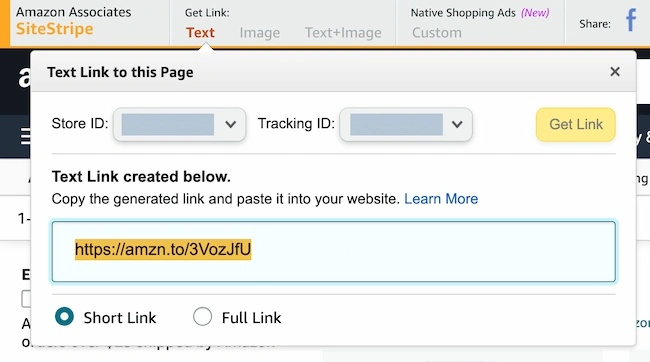
- Use the SiteStripe Tool: Once enrolled, a toolbar called SiteStripe appears when you log in to your Amazon account. This tool makes it easy to generate affiliate links.
- Navigate to the product page on Amazon.
- Click on the Get Link option on the SiteStripe bar.
- Choose between text links, image links, or text + image links.
- Generate Links from the Dashboard:
- Go to the “Product Linking” tab in the Amazon Associates dashboard.
- Click on “Product Links” and search for the product.
- Click “Get Link” for the desired product and customize it if needed.
- Shorten Links (Optional): Use Amazon’s built-in link shortener for a cleaner, shareable link. Useful when you need to share many links simultaneously.
Share the Amazon Affiliate Links

- Embed Links in Content: Add affiliate links to blog posts, product reviews, or tutorials.
- Use Social Media: Share links on platforms like Instagram, Facebook, or Twitter (ensure compliance with Amazon’s affiliate guidelines).
- Email Newsletters: Include links in your email campaigns, provided your subscribers have consented.
Best Practices and Tips to follow

- Follow Amazon’s Policies: Ensure compliance with Amazon’s affiliate guidelines to avoid account termination.
- Disclose Your Affiliate Relationship: Inform your audience that you earn commissions through the links.
- Choose Relevant Products: Promote items that align with your niche and audience preferences.
- Monitor Performance: Use the Amazon Associates dashboard to track clicks, conversions, and earnings. Checkout Amazon Commission Rates Worldwide!

- Optimize Content: Regularly update your content with new and trending products to keep your audience engaged.
By following these steps, you can easily generate and share affiliate links from Amazon, creating a potential revenue stream while providing value to your audience. For any queries, you can contact on support@cuelinks.com or +918291035656.